dasher
Dasher: Your Agile Feature Toggle and Experimentation Engine


Dasher empowers startups and agile teams to rapidly iterate, test, and validate ideas without costly upfront development.
Key Features
- 🚩 Feature Flags: Enable/disable functionality at runtime.
Upcoming Features
- A/B Testing: Compare multiple versions and track results.
- Percentage Rollouts: Gradually increase exposure to new features.
- User Targeting: Deliver personalized experiences based on user attributes.
- Metrics Tracking: Integrate with your analytics platform for in-depth analysis.
- Audit Logs: Maintain a record of changes for transparency.
Why Dasher?
- De-risk Innovation: Safely launch new features or UI changes to a subset of users. Gather real-world feedback and data before full rollout.
- Data-Driven Decisions: Run A/B experiments to compare variations and measure impact on key metrics. Make informed choices about what works best.
- Simple Integration: Lightweight library designed for minimal disruption to your existing codebase. Get up and running quickly.
- Flexible Control: Define targeting rules based on user segments, demographics, or even custom criteria.
- Real-time Management: Adjust feature flags and experiment parameters on the fly through a user-friendly dashboard (or API).
Who Should Use Dasher?
- Product Teams: Experiment with new features and gather data to inform the product roadmap.
- Marketing Teams: Test different messaging or promotional strategies to optimize campaigns.
- Engineering Teams: Mitigate the risk of releasing new code by gradually rolling it out.
Preview
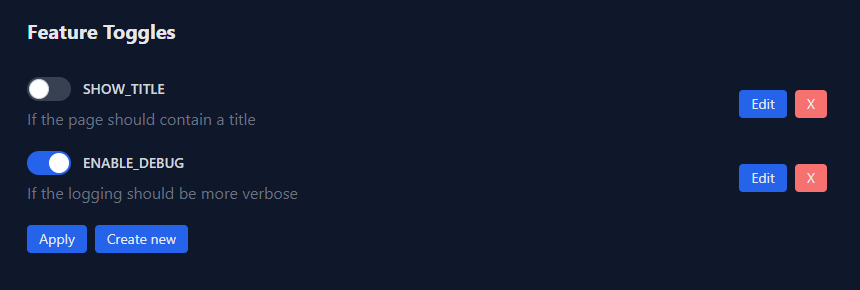
Getting Started
Start the server
You can use the official Docker image. Because Dasher is a stateful application, make sure to mount a volume to the container. The following example uses the current working directory as data volume.
docker run --name my-dasher-server \
    -p 3000:3000 \
    -p 50051:50051 \
    -v .:/data \
    ghcr.io/flohansen/dasher-server:latest
Define feature toggles in your application
go get github.com/flohansen/dasher
package toggles

import (
    "github.com/flohansen/dasher/pkg/dasher"
)

var (
    VerboseLogging = dasher.NewFeature(dasher.FeatureOptions{
        Name: "USE_VERBOSE_LOGGING",
        Description: "If the application should log more verbose",
    })

    // Add more features ...
)

func init() {
    // This registers the feature. The dasher server will create a toggle, if
    // it does not exist.
    dasher.MustRegister(VerboseLogging)

    // Register more features ...
}
package main

import (
    "context"
    "log"
    "os"

    "github.com/flohansen/dasher/pkg/dasher"
)

var (
    dasherServerAddr = os.Getenv("DASHER_SERVER_ADDR")
)

func main() {
    ctx := context.Background()

    // This will subscribe to any changes related to the defined features. On
    // every change the states of the features will be updated.
    go dasher.Listen(ctx, dasherServerAddr)

    for {
        // Check the state of the feature toggle. The "Enabled" property is
        // being synchronized with the feature toggle state of the server.
        if toggles.VerboseLogging.Enabled {
            log.Println("wait one second...")
        }

        time.Sleep(time.Second)
    }
}